
MECH AI: Diagnostic & Repair
MECH.AI LLCAuto & Vehicles
4.2243.00 Reviews
- Version
- 1.3.40
- Installs
- 100.00K
- Age Rating
- Everyone
Screenshots
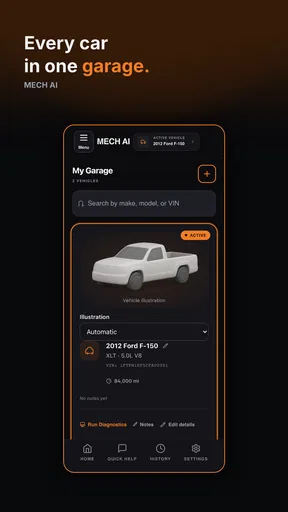
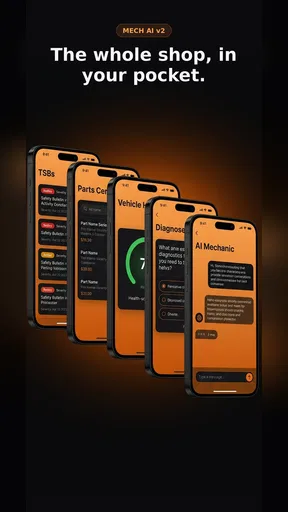


Our Review of MECH AI: Diagnostic & Repair
 Analysis by Appyee
When a dashboard warning appears, the first challenge is often not fixing the car but working out what the warning means and what to do next. MECH AI: Diagnostic & Repair is aimed at that moment: it brings AI-assisted automotive help together with car diagnostics, so you can start investigating rather than guess at the cause. I see its strongest role as a practical first step for drivers who want more context before deciding whether to handle an issue themselves or call a mechanic.
What the app can offer a driver
MECH.AI LLC makes this free Auto & Vehicles app for Android, where it has reached over 100,000 installs and an average rating of 4.2 from around 620 ratings. It is rated for Everyone, and version 1.1.9 is the current release. Those figures suggest that it has found an audience, but they do not make it a substitute for a workshop inspection. I would treat its explanations as guidance for understanding a problem, not as a final diagnosis or a guarantee that a suggested repair is right for every vehicle.
Getting useful information starts with the right setup
First things first, setting up MECH AI: Diagnostic & Repair is a breeze. Once you download it from the App Store or Google Play, you’re greeted with a user-friendly interface that even my grandma could navigate. The app does a fantastic job of guiding you step-by-step through the setup process. You’ll need a Bluetooth OBD2 scanner, which connects to your car’s diagnostic port. The app syncs with this device to read your car’s performance data. It's like having a mini mechanic in your pocket.
The scanner is an important part of the decision. If you already own a compatible Bluetooth OBD2 reader, the app can fit into a relatively simple check-at-home routine. If you do not, account for that extra hardware before expecting a phone alone to read diagnostic data. When shopping for a scanner, check that it suits your vehicle and works with the app; the phone cannot retrieve the car’s diagnostic information by itself. I’d also keep the scanner’s instructions nearby the first time, since a solid connection is the starting point for any useful result.
From an alert to a sensible next step
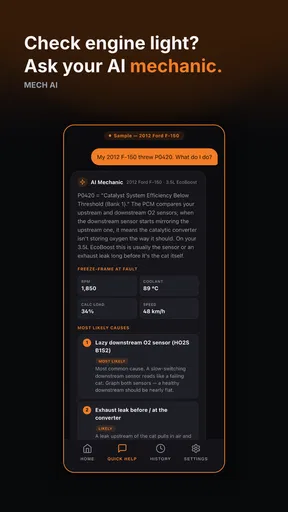
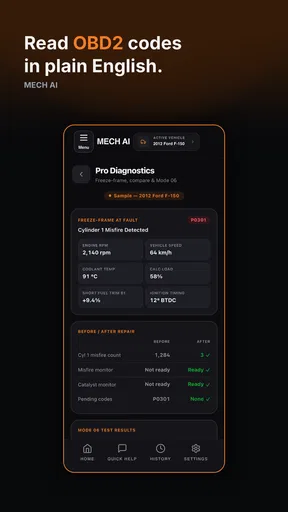
Okay, let's talk about features because this app is packed with them. The real-time diagnostics is a game-changer. I mean, who wouldn’t want to know what’s going on under the hood without having to pop it open? The app provides comprehensive diagnostic reports that are easy to understand, even if you're not a car expert. It highlights issues with a simple explanation, and I love how it even suggests possible fixes. It’s like having a friend who really knows cars.
The most useful way to approach a report is as a starting point for investigation. A plain-language explanation can help you describe a symptom to a repair shop, while a suggested fix may give you a question to ask rather than a repair to attempt immediately. I would note the warning, when it appeared, and what the car was doing at the time. That context can matter: an alert that appears alongside rough running or a change in braking deserves more caution than a code considered in isolation. If the car feels unsafe, stop driving when it is safe to do so and seek qualified help.
There is also a practical difference between seeing diagnostic information and knowing the full condition of a car. A scanner-based reading can help narrow down an issue, but it does not replace a hands-on inspection, and a suggested fix may not account for every detail of a particular vehicle. For routine questions, that distinction is useful rather than discouraging: I can use the app to become better informed, then decide whether the next step is checking the owner’s manual, asking a mechanic, or arranging a repair.
Maintenance reminders are most helpful when kept realistic
Another neat feature is the maintenance reminders. You can set alerts for oil changes, tire rotations, and other routine services. Trust me, I’m terrible at remembering these things, so having the app remind me is a lifesaver. Plus, it can potentially save you from costly repairs down the road.
I would use reminders as prompts to check the service schedule, not as a universal timetable for every car. Maintenance intervals vary by model, driving conditions, and the work already done, so putting the right information into a reminder matters. A useful habit is to record a service soon after it happens and set the next prompt from the vehicle’s manual or a mechanic’s advice. That turns a general notification into a personal record-keeping aid instead of an alert that might arrive too early or too late.
For a busy driver, this can be a small but worthwhile workflow: check the reminder before a long trip, confirm the service history, and bring any overdue work up with a garage. It is less about expecting an app to maintain the vehicle automatically and more about reducing the chance that ordinary maintenance slips your mind.
A calmer interface, with sensible limits
The user experience is top-notch. The interface is clean and intuitive, which makes navigating through the app a pleasure rather than a chore. The graphics are neat, and the information is presented in a way that’s not overwhelming. I appreciate that because I’ve used other apps that just dump data on you, leaving you more confused than when you started.
The app also offers a community forum where users can share experiences and tips. It's a nice touch, especially if you’re dealing with a particularly tricky issue and need some advice. It’s like having a virtual car club at your fingertips.
Community advice can be useful for discovering what questions other owners asked or which symptoms they noticed, but I would not treat a forum response as a diagnosis for my own car. Two vehicles can show similar symptoms for different reasons, and a post may not match the model, condition, or circumstances involved. I’d use discussion to build a better question for a professional, while keeping urgent safety concerns out of the hands of casual guesses.
Who will get the most from it
So, why should you consider downloading this app? Well, if you drive a car, it’s pretty much a no-brainer. Whether you’re a car enthusiast who loves to tinker or someone who barely knows how to change a tire, this app offers something for everyone. It empowers you with knowledge about your vehicle, potentially saving you time and money.
In practice, I think it suits a curious owner who wants to understand a warning before booking a service, a hands-on driver who already has an OBD2 scanner, or someone who benefits from a nudge to keep routine maintenance on track. It is less suitable for a driver who expects a phone to identify every mechanical fault without a scanner, or for anyone who wants a repair manual with guaranteed, vehicle-specific instructions. If you are dealing with a serious fault, an unfamiliar repair, or a safety-critical system, a qualified mechanic is the better choice.
It also occupies a different middle ground from the usual alternatives. A basic code-reader app may expose technical codes without much explanation, while a repair shop can inspect the vehicle directly but requires arranging a visit. MECH AI’s appeal is the combination of accessible diagnostic context, AI-assisted help, reminders, and discussion in one place. That convenience is valuable for triage and preparation; it should not be confused with the certainty of a physical inspection or the depth of a mechanic’s experience.
How I would use it during an ordinary car problem
Picture a check-engine light coming on during a routine commute. I would pull over if the car showed worrying symptoms, then check whether it was safe to continue rather than trying to troubleshoot while driving. Once parked, I would connect the OBD2 scanner, use the app to understand the reading, and write down the symptoms and circumstances. If the explanation points toward a simple issue, I would still confirm the right procedure for my vehicle before doing anything. If the warning persists, the car runs poorly, or the cause remains unclear, I would share the information with a garage and arrange an inspection.
That workflow is a more realistic promise than “fix the car from your phone.” The app can help turn a vague warning into a more informed conversation, which may save time when explaining the problem. It can also help me avoid replacing parts based on a guess. The trade-off is that I still need the scanner, enough care to interpret advice cautiously, and a mechanic when the situation calls for one.
Version, cost, and what I would watch next
The app is free to install, but it includes in-app purchases ranging from $0.99 to $749.99 per item. That is a wide span, so I would check the purchase details inside the app before committing to anything and decide whether the free experience meets my needs first. Its current version is 1.1.9, and it was released on April 21, 2024. Those are useful markers of the product’s current state, but they do not by themselves show which functions have changed or how a particular update affects an existing user.
The developers seem committed to making this the best car diagnostic tool out there. It’s reassuring to know that they’re always working to enhance the user experience.
For an existing user, the practical test of any new version is whether setup remains dependable, reports are easy to interpret, and reminders remain useful for the vehicle being tracked. I would also watch how clearly the app distinguishes general guidance from advice that depends on a specific model or repair history. Those are the details that determine whether an AI mechanic assistant earns a place in regular car care, rather than being opened only when a warning light appears.
My bottom line
In conclusion, MECH AI: Diagnostic & Repair is more than just an app; it’s a comprehensive car care assistant. From real-time diagnostics to maintenance reminders, it covers all the bases to keep your vehicle in tip-top shape. It’s reliable, easy to use, and packed with valuable features that cater to both car novices and experts alike.
So next time your car throws a tantrum, instead of feeling helpless, you can whip out your phone, fire up the app, and get to the root of the problem in no time. It’s a must-have for anyone who wants to take control of their car maintenance and avoid those dreaded trips to the mechanic. Trust me; you’ll wonder how you ever got by without it.
Verdict
Strengths of MECH AI: Diagnostic & Repair
- AI-driven diagnostics ensure accuracy.
- User-friendly interface simplifies tasks.
- Wide range of vehicle compatibility.
- Real-time updates enhance functionality.
- Cost-effective alternative to workshops.
Limitations of MECH AI: Diagnostic & Repair
- Requires stable internet connection.
- Limited offline functionalities.
- Subscription required for full features.
- May not support older vehicle models.
- Occasional AI misdiagnosis reported.
Similar Picks in This Category
View All
Android Auto
Google LLC4.1

maxim — order a taxi & food
PT. SITO4.7

Штрафы ГИБДД: проверка с фото
Pays LLC – Штрафы ГИБДД4.7

Номерограм – проверка авто
Авто Ассист4.8

Дром Авто
Дром4.9

Frequently Asked Questions
What is MECH AI: Diagnostic & Repair and how does it work?
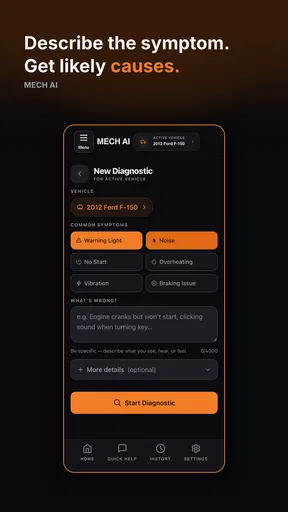
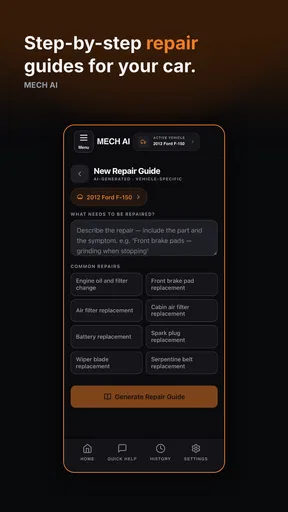
MECH AI: Diagnostic & Repair is an innovative app designed to assist users in diagnosing and repairing mechanical issues in vehicles. Utilizing advanced AI technology, the app analyzes input data to identify potential problems and suggests solutions. Users simply input symptoms or scan vehicle data, and the app provides step-by-step repair guidance.
Is MECH AI: Diagnostic & Repair compatible with all vehicle models?
While MECH AI: Diagnostic & Repair supports a wide range of vehicle models, compatibility may vary depending on the make and model of your vehicle. The app regularly updates its database to include new models, but it’s advisable to check the supported vehicle list within the app or on the official website before downloading.
How accurate are the diagnostic results provided by MECH AI: Diagnostic & Repair?
The app leverages cutting-edge AI algorithms to deliver highly accurate diagnostics. However, the accuracy can depend on the quality of the input data and the complexity of the issue. It’s recommended to use the app as a supplementary tool alongside professional diagnostics for the best results.
Does MECH AI: Diagnostic & Repair require an internet connection to function?
MECH AI: Diagnostic & Repair requires an internet connection for initial data downloads and updates. However, once the necessary data is downloaded, many of the diagnostic features can be accessed offline. For real-time updates and more complex diagnostics, an active internet connection is recommended.
Are there any subscription fees or in-app purchases in MECH AI: Diagnostic & Repair?
MECH AI: Diagnostic & Repair offers a free version with basic features. For more advanced diagnostics and repair guidance, users may need to purchase a subscription or individual features through in-app purchases. The app provides clear information about its pricing structure and what is included in the free and paid versions.
